

Pipeline and CRM
Where your company's pipeline lives, what ALTARA reads and what it can change, always after your yes.
ALTARA works in your company's pipeline, inside the CRM your company uses. Each company has one pipeline, and the whole team works in it.
Where the pipeline lives
| CRM | How it works |
|---|---|
| The ALTARA CRM | The pipeline lives in ALTARA itself, with nothing to install. It is the default start for teams without a CRM. Stages: Prospecção, Contato, Qualificação, Proposta, Negociação, Ganho and Perdido (prospecting, contact, qualification, proposal, negotiation, won and lost). |
| Pipedrive | ALTARA reads and writes in a Pipedrive pipeline. |
| HubSpot | Being rolled out with the first companies. ALTARA reads one pipeline in your company's HubSpot, read-only: it saves nothing. |
The ALTARA team picks and connects the CRM when it creates your company. To use another CRM later, talk to the ALTARA team.
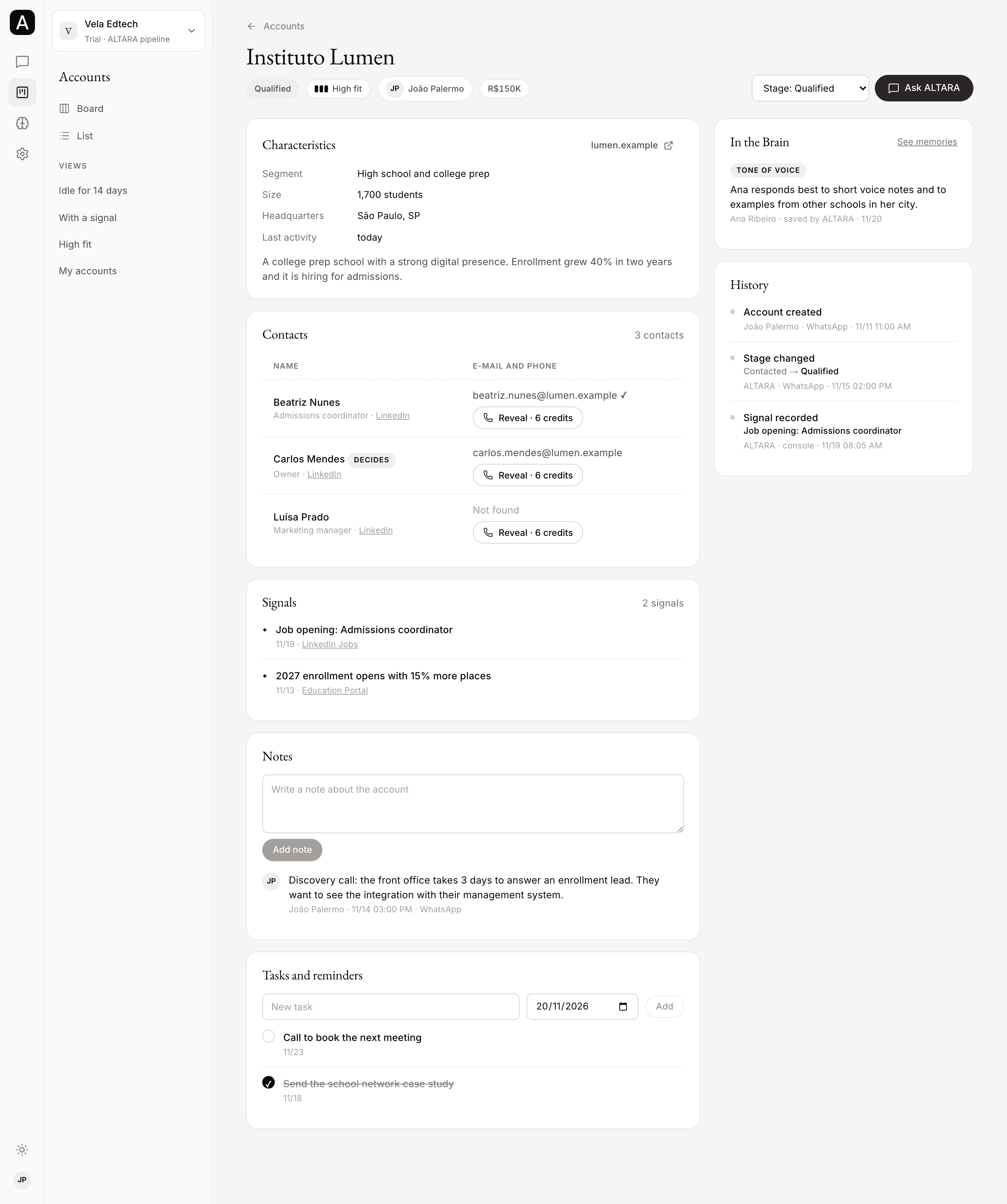
In the console, the same pipeline shows under Accounts, as a board and as a list. See Accounts.
What ALTARA reads
- The leads in the pipeline: stage, status, owner, main contact (name, e-mail and phone) and the fields your company uses, such as value or segment.
- The notes on each lead.
- The tasks and next steps, such as planned calls, meetings and e-mails, done or not.
- The loss reason of lost leads.
It reads only your company's pipeline. Deals in other pipelines of the same CRM are left out.
What it can change
Always after your yes. See how it confirms.
| Change | Example request |
|---|---|
| Stage | "Move Grupo Aurora to Negotiation" |
| Note | "Note that Ana asked for a 10% discount" |
| Task, with the day and, if you say so, the time. It can be a task, call, meeting or e-mail. | "Set a call with Ana on Monday at 10 AM" |
| Owner of the lead | "Hand Felipe's leads over to Mariana" |
| Main contact: fix the name, e-mail or phone, remove a detail, or switch to another person | "Aurora's contact is now Carlos Souza" |
| New lead | "Add Fonseca Metals, contact John Lima" |
| File on the lead: a screenshot or a PDF, with a summary note | "Attach this proposal to Grupo Aurora" |
| Leads from a spreadsheet, up to 200 at a time | "Add the leads in this spreadsheet" |
To mark a lead as won or lost, or to reopen it, use the commands /ganho, /arquivar and /reabrir.
- Owner: anyone who uses the company's CRM can own a lead. On Pipedrive, the account's active users; on the ALTARA CRM, the company's members. If the name matches nobody, or more than one person, ALTARA asks who you mean, with the options.
- Contact: switching to another person does not delete the previous one. They stay in the CRM.
- New lead: before adding it, ALTARA checks whether the company is already in the pipeline.
- Spreadsheet: ALTARA leaves out companies already in the pipeline (open or lost), repeated rows and rows without a company. Then it shows how many leads go in, with a few examples, and asks you to confirm them all at once. Uploading many leads takes a few minutes.
HubSpot: read-only
Reading HubSpot is being rolled out with the first companies. If your company uses HubSpot, talk to the ALTARA team.
In a company that uses HubSpot, ALTARA reads one pipeline: deals, stages, owners, companies, contacts, notes, tasks, calls, meetings and the e-mails logged in HubSpot, when the access allows. It saves nothing.
- Your deals are the ones whose HubSpot owner has your name. If ALTARA cannot find you, or finds more than one similar name, it asks which one is you.
- Changes: it proposes them the same way and asks you to confirm. After your yes, it saves nothing: it sends the exact change, lead by lead, with a link to the deal in HubSpot, so you can make it there.
- Commands such as
/moverand/notasave nothing. - Short lists: it shows up to about 10 deals at a time, highest value first, and offers the next ones.
- First leads: people who join a company on HubSpot get no first leads, since there would be nowhere to save them.
- In the console, the Accounts area has a button that opens the pipeline in HubSpot.
The ALTARA team connects your company's HubSpot with read-only access.
Counting activities
Ask "how many calls did we make this week?" or "how many tasks are overdue?". ALTARA counts the activities of the whole pipeline or of one lead, over a period if you give one: total, done, open, overdue, by type, by assignee, and the 10 leads with the most activities.
- On Pipedrive, it counts every activity type in the account.
- On the ALTARA CRM, it counts the tasks.
- Counting changes nothing in the CRM.
Everything is recorded
Every change made by ALTARA, by a command or in the console is recorded: who made it, when, where (WhatsApp or web), what it was before and what it became. On the ALTARA CRM, you see this under History, on the account's page.
To go back:
- A command: send
/desfazerwithin 24 hours. - A card moved in the console: click Undo right after moving it.
- A stage, owner or contact changed in the chat: ask ALTARA to put it back as it was. It prepares the opposite change and asks you to confirm.