

Balance, alerts and top-ups
Where to see the company's credits, what happens when they run low, and how to get more.
See the balance in the console
In the console, click Settings.
Under Team, open Usage and credits.
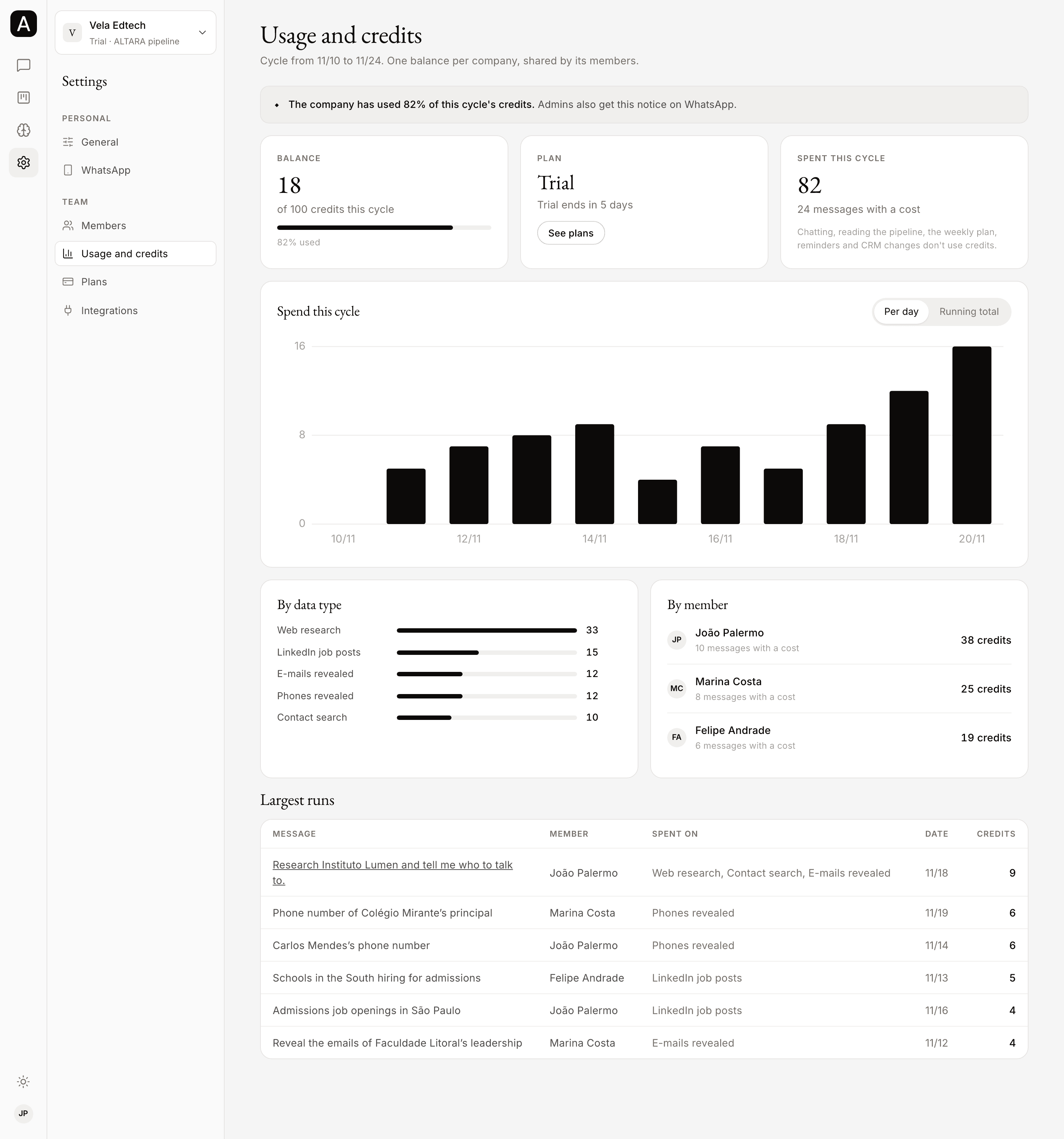
The page shows the current cycle, with its start and end dates at the top:
- Balance: how many credits the company has left, out of the cycle's total, and how much has been used.
- Plan: the current plan and the date the credits renew, or how many days are left in the trial. The See plans button opens the Plans page.
- Spent this cycle: the credits spent and how many messages had a cost.
- Spend this cycle: the spend chart, Per day or Running total.
- By data type: how much went on web research, contact searches, e-mails, phones and job posts.
- By member: how much each person on the team spent.
- Largest runs: the messages that spent the most, with who asked, what the credits went on, the date and the credits.
Every member of the company can see this page, not only admins.
If the page shows the Sample data notice, it doesn't show your company's numbers yet. In the meantime, ask ALTARA for the balance on WhatsApp.
Ask for the balance on WhatsApp
There is no command to learn. Ask in your own words, for example "how many credits do we have left?", and ALTARA answers with the company's balance. Asking costs nothing.
The breakdown by type of spend and by member is in the console.
When the balance runs low
| Balance | What happens |
|---|---|
| 10 credits or more | Everything works as usual. |
| Below 10 | Research pauses: no web searches, page reads, contact searches, e-mails, phones or job posts. ALTARA says so and carries on with the pipeline, the weekly plan and messages. |
| Below 1 | ALTARA doesn't answer messages. Instead, it sends a fixed notice that the credits have run out. |
The fixed notice says the company's credits on ALTARA have run out, that your pipeline and your conversations are still there, and that to continue you just need to talk to ALTARA.
Even with no credits, these keep working:
- the console: accounts, Brain, members, usage and plans;
- reminders already set;
- the CRM commands on WhatsApp (send /comandos for the list).
In the middle of a message
Credits are taken as ALTARA works. If the balance reaches zero in the middle of a request, it stops researching, answers with what it has and tells you what was left out. Only that message's research charge can take the balance slightly below zero. E-mails and phones are revealed only as far as the balance pays; the other people keep just their name and title.
When the trial ends
When the trial ends, any credits left stop counting, and ALTARA answers messages with a fixed notice that the company's trial on ALTARA has ended, that your pipeline and your conversations are still there, and that to continue you just need to talk to ALTARA.
To carry on, choose a plan. See How billing works.
80% and 95% alerts
Once the company has used 80% of the cycle's credits, the Usage and credits page shows how much has been used at the top. The ALTARA team also gets an alert at 80% and another at 95%.
The cycle's total counts everything that came into it: the plan's credits, what rolled over from the month before, and top-ups.
Nothing is deleted
Running out of credits deletes nothing. The pipeline, accounts, conversations and Brain stay where they are, and ALTARA works with them again as soon as credits come in.
How to get more credits
You can't buy credits in the console. There are three ways:
- Wait for the renewal. On monthly and annual plans, the plan's credits come in again every month, on the date shown in the Plan card.
- Ask for a top-up. Talk to the ALTARA team. Top-up credits go into the current cycle and follow the plan's usual rollover rules.
- Move to a bigger plan. In Settings → Plans, pick the plan and click Subscribe. See How billing works.
Price per credit on a top-up, as listed on altaratech.com/pricing:
| Plan | Price per top-up credit |
|---|---|
| Solo | $0.37 |
| Starter | $0.30 |
| Growth | $0.24 |
On Scale, the terms are set in the contract.